
Your privacy choices

We use cookies to see how the site is used and, with Google and Meta, to measure our ads. Nothing is set until you choose. You can change your choice at any time under Cookie settings.

Privacy Policy

We use cookies to see how the site is used and, with Google and Meta, to measure our ads. You can change your choice at any time under Your Privacy Choices.

Your privacy choices

Choose which cookies we may use. Your choice applies on every page and lasts 12 months.

Your opt-out preference signal has been honored. Advertising stays off while your browser sends it.

NecessaryKeeps the site working: your privacy choice here, the language you are reading in, the documentation search, and Cloudflare's protection of the site.
Always on
Google Analytics and Cloudflare Web Analytics, and WooCommerce's own record of the page your visit started on: which pages are read, how the site is used, and which of them lead to an order.
Google Ads and the Meta pixel: measuring and improving our ads, including on other sites.
ThriveDesk, which runs the live chat on our support page. It is run by another company and stores an identifier in your browser.
Privacy Policy

Search Plugin Compatibility Guide | Bright Plugins Docs

1 min read Updated April 17, 2026 By the Bright Plugins team

Get Min/Max Quantities Pro

The compatibility is a beta feature focused on third party search plugins that use Ajax / Autocomplete for displaying results as autocomplete. Usually free plugins do not search for custom taxonomies. If you are using a paid plugin probably you can keep the integration disabled.
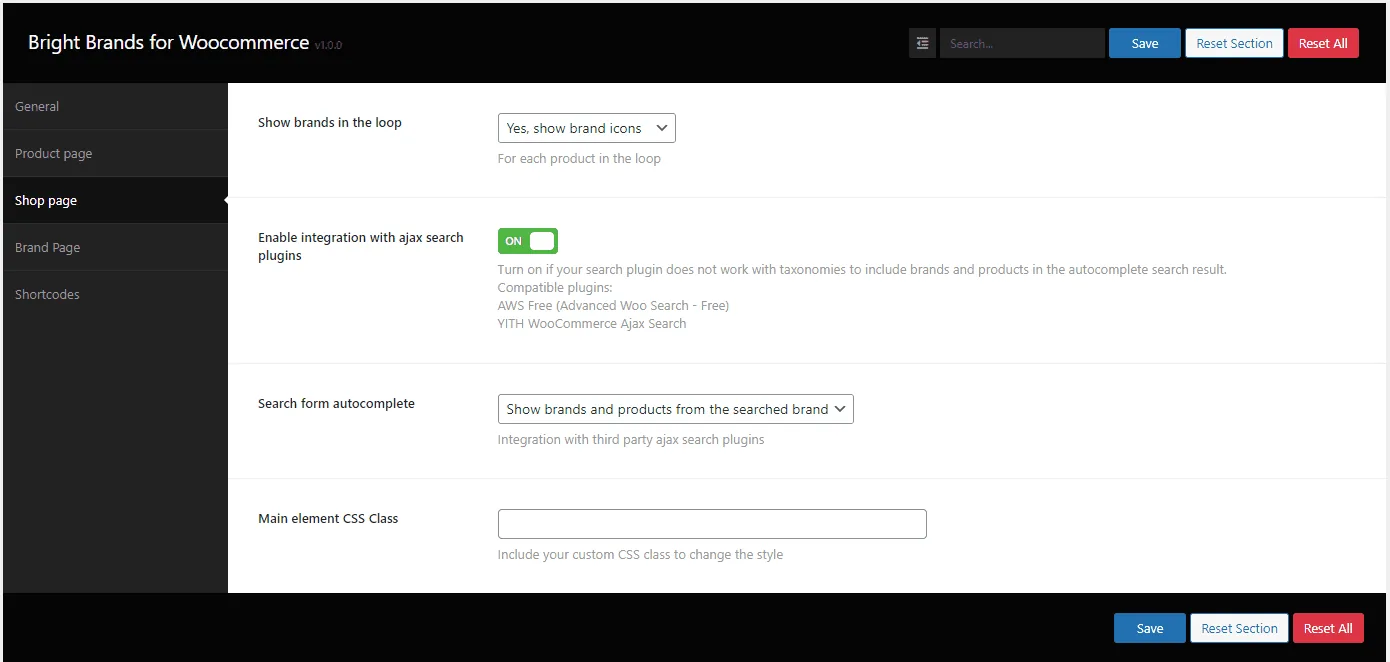
Min/Max Quantities for WooCommerce: settings auto complete

Enable integration with ajax search plugins: Turn on to enable. If user type a brand name, it will be included in the autocomplete results

Search form autocomplete:

– Show brands and products from the searched brand: When customer type a brand name it will be shown the brands that matches with the keyword and also all products from the brand. Ex: if user types apple, it will show Apple and the Apple Products (limited to 10 entries)
– Show only brands list that matches with the search: It shows only the brands and not the products inside the brand
– No integration: Disable the feature
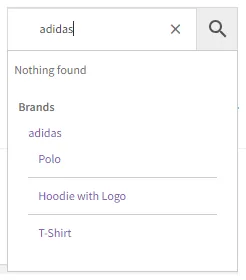
Min/Max Quantities for WooCommerce: adv woo search plugin integration

If your plugin is not supported you can open a support ticket and we check if possible to integrate on future releases

Current supported plugins:
– Advanced Woo Search – Free
– YITH Ajax Search – Free

Updated on April 17, 2026 · Need help? Open a support ticket