
If you have upgraded to Pro and want to use MailChimp here’s how to set things up:
MailChimp#
- Login to MailChimp
- Go to your Profile > Extras > API Keys
- Copy your API key
- Create or select a list
- Go to the Audience > Manage Audience ( Settings )
- Copy the Unique ID at the bottom of the page
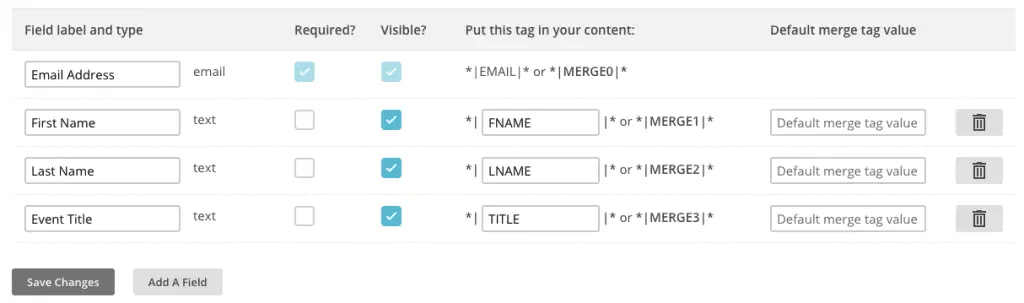
- Go to the list Audience > Settings > Audience fields and *|MERGE|* tags
- Set the following fields: ( make sure you add Text field TITLE )
WordPress#
- Login to your WordPress dashboard
- For QEM Go to Settings > Event Manager > Extensions
- Enter your Mailchimp List ID and API key
- If you want automated list additions check the ‘Optin not required’ box
- If you want an optin there is an Optin Checkbox in the form fields
Updated on April 22, 2026 · Need help? Open a support ticket