
In high-turnover eCommerce industries such as electronics, limited-edition fashion, or industrial spare parts, every minute a product remains “reserved” without payment represents lost revenue. The biggest problem for administrators is Stock Sequestration: bank transfer orders that are never completed and block sales to real customers.
With Custom Order Status Manager PRO, you can implement a “Time Sensor” that manages your inventory autonomously.
The Success Case: Managing High-Demand Products#
Imagine you sell a next-generation gaming console or a critical air conditioning spare part. You only have one unit left.
Automatic Reservation#
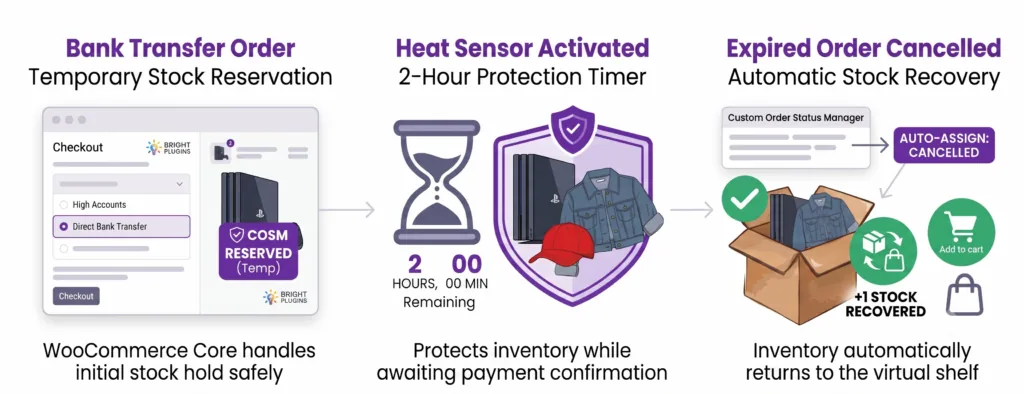
A customer selects the product and chooses “Bank Transfer.” The plugin moves the order to the Temporary Reservation status. The WooCommerce core handles the initial stock hold safely without duplicating inventory reduction.
The “Time Sensor” (Time Rule)#
The administrator activates a 2-hour timer. During this time, the product is protected for the buyer while awaiting payment confirmation.
Stock Release#
If payment is not confirmed within those 2 hours, the plugin detects the inactivity, changes the status to Cancelled, and automatically returns the product to the virtual shelf. The sale becomes available again for the next interested customer.
5-Minute Setup Guide#
Follow this logical engineering configuration to protect your inventory:
1. Create the Control Status#
Navigate to WooCommerce > Order Status > Add New Order Status.
- Name: Temporary Reservation
- Inventory Settings: Leave custom stock options disabled (do not force reduce/increase).
- Impact: The product remains correctly allocated while awaiting payment, avoiding double-deductions from the gateway.
2. Automate Assignment by Payment Method#
Go to Bright Plugins > Order Status Settings > Payment Methods.
- Locate Default Status for: Direct bank transfer.
- Select your new status: Temporary Reservation.
- Impact: Every bank transfer order automatically routes into your monitored reservation box without manual intervention.
3. Configure the Time Sensor (Master Rule)#
Go to Bright Plugins > Order Status Settings > Automation Rules and click Add Automation Rule.
- Rule Type: Time-Based Status Change
- From Status: Temporary Reservation
- To Status: Cancelled
- Time in Status: 2 Hours
- Impact: Triggers an isolated background event via Action Scheduler to safely transition expired orders.
4. Automatic Asset Recovery#
By routing the expired order directly to the native Cancelled status, WooCommerce Core automatically handles inventory restoration.
- Impact: Inventory immediately returns to the public catalog with 100% data integrity and zero manual stock syncing.
Updated on July 22, 2026 · Need help? Open a support ticket