
En industrias de comercio electrónico con alta rotación como la electrónica, la moda de edición limitada o las piezas de repuesto industriales, cada minuto que un producto permanece "reservado" sin pagar representa una pérdida de ingresos. El mayor problema para los administradores es la Captura de Acciones: órdenes de transferencia bancaria que nunca se completan y bloquean ventas a clientes reales.
Con Custom Order Status Manager PRO, puedes implementar un "Sensor de Tiempo" que gestiona tu inventario de forma autónoma.
El caso de éxito: Gestionar productos de alta demanda#
Imagina que vendes una consola de videojuegos de nueva generación o una pieza de repuesto de aire acondicionado fundamental. Solo te queda una unidad.
Reserva automática#
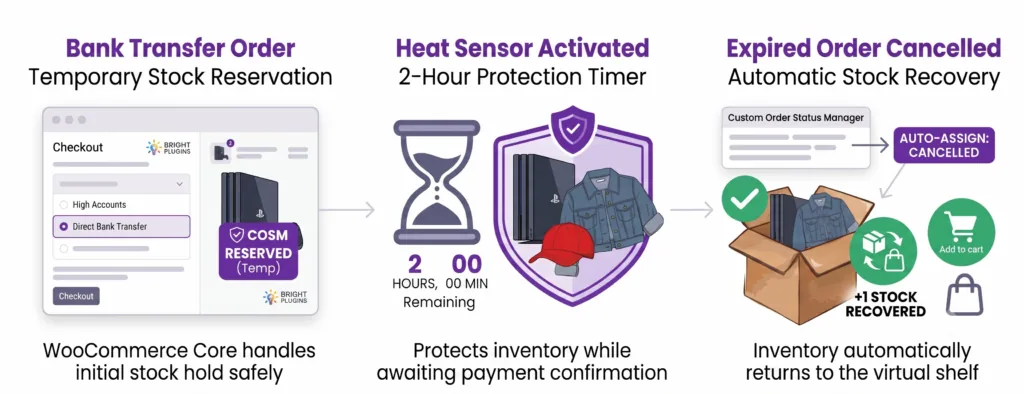
A customer selects the product and chooses “Bank Transfer.” The plugin moves the order to the Temporary Reservation status. The WooCommerce core handles the initial stock hold safely without duplicating inventory reduction.
The “Time Sensor” (Time Rule)#
The administrator activates a 2-hour timer. During this time, the product is protected for the buyer while awaiting payment confirmation.
Lanzamiento de acciones#
If payment is not confirmed within those 2 hours, the plugin detects the inactivity, changes the status to Anulado , and automatically returns the product to the virtual shelf. The sale becomes available again for the next interested customer.
Guía de montaje de 5 minutos#
Sigue esta configuración lógica de ingeniería para proteger tu inventario:
1. Crear el estado de control#
Vaya a WooCommerce > Order Status > Add New Order Status .
- Nombre: Temporary Reservation
- Inventory Settings: Leave custom stock options disabled (do not force reduce/increase).
- Impacto: The product remains correctly allocated while awaiting payment, avoiding double-deductions from the gateway.
2. Automatizar la cesión por método de pago#
Vete a Bright Plugins > Order Status Settings > Payment Methods .
- Locate Default Status for: Direct bank transfer .
- Select your new status: Temporary Reservation .
- Impacto: Every bank transfer order automatically routes into your monitored reservation box without manual intervention.
3. Configurar el sensor de tiempo (regla maestra)#
Vete a Bright Plugins > Order Status Settings > Automation Rules and click Agregar regla de automatización .
- Tipo de regla: Cambio de Estado Basado en Tiempo
- From Status: Temporary Reservation
- To Status: Anulado
- Tiempo en Estado: 2 horas
- Impacto: Triggers an isolated background event via Action Scheduler to safely transition expired orders.
4. Recuperación automática de activos#
By routing the expired order directly to the native Anulado status, WooCommerce Core automatically handles inventory restoration.
- Impacto: Inventory immediately returns to the public catalog with 100% data integrity and zero manual stock syncing.
Actualizado el 22 de julio de 2026 · ¿Necesita ayuda? Abra un ticket de soporte