How to Stop Form Spam in Its Tracks: The Complete Guide to Blocking IPs in Gravity Forms
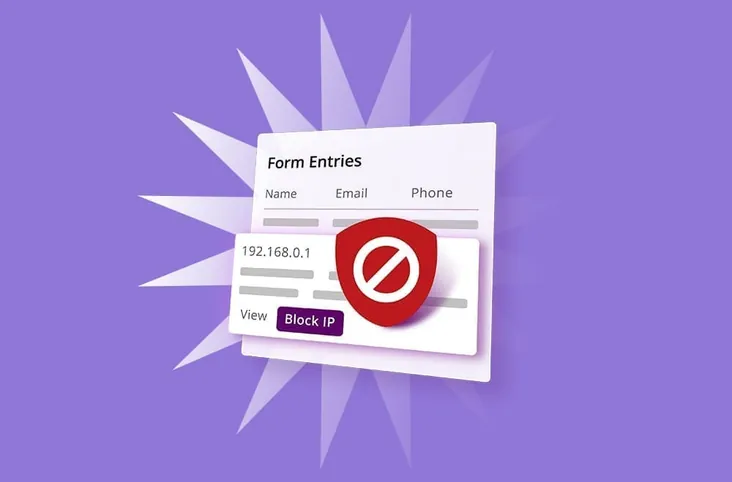
Online store owners frequently encounter form spam, including fake contact submissions that flood inboxes, automated entries that corrupt customer records, and repeated bot activity that skews reporting data. In more serious situations, spam goes beyond mere annoyance and becomes a warning sign of scripts probing sites for vulnerabilities. When left unaddressed, this digital noise consumes valuable administrative time, degrades data quality, and creates security gaps that can compromise both store performance and customer confidence.
Gravity Forms offers multiple layers of protection designed to control spam before it escalates into a larger problem. IP blocking is a practical approach that allows site administrators to stop repeat offenders directly at the source. When paired with built-in spam filters, honeypots, and validation rules, IP blocking can substantially reduce unwanted submissions while maintaining smooth customer interactions. This guide delivers practical, accessible strategies specifically designed for small business owners running eCommerce operations, demonstrating how to limit spam efficiently without sacrificing form speed, accessibility, or user experience.
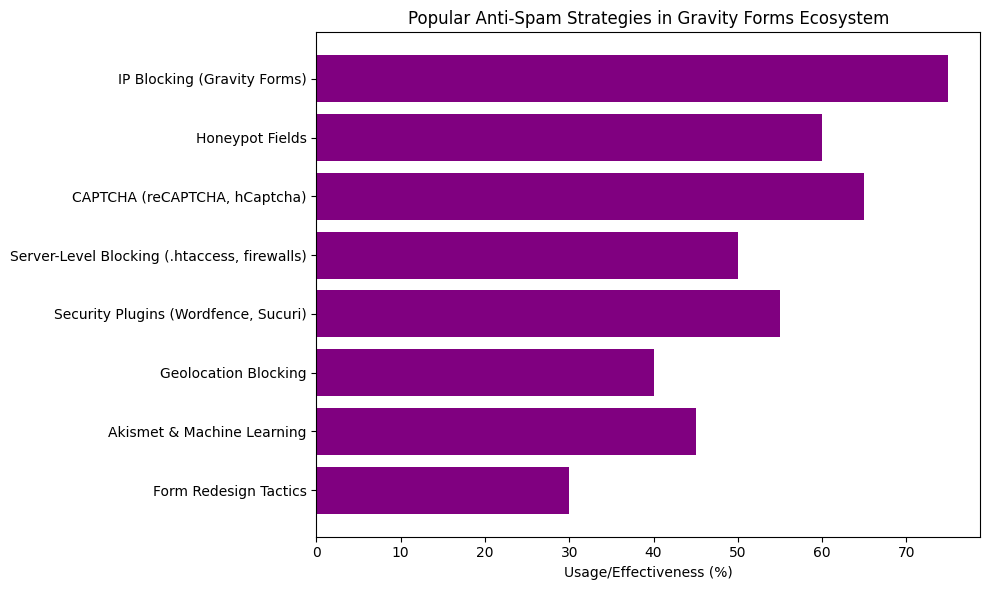
This bar chart highlights the most widely used anti-spam strategies among Gravity Forms users. IP blocking emerges as a popular method thanks to its direct control and straightforward implementation. Honeypot fields and CAPTCHA are also frequently deployed to catch bots. Server-level defenses and security plugins provide broader protection, while geolocation filtering and Akismet deliver specialized support. The redesign of forms remains a lighter, last-resort approach. Together, these insights reveal how layered defenses work together to keep form spam under control.
Why Form Spam Happens (And Why It Matters)
Form spam persists because automated bots continuously scan WordPress sites for open submission endpoints. Public-facing forms are easy targets because they accept user input, trigger backend processes, and often connect directly to email systems or databases. Some bots operate opportunistically, submitting generic spam across numerous sites, while others work more deliberately, probing forms to locate weak validation, outdated plugins, or misconfigured security rules.
For eCommerce operations, the consequences extend far beyond inbox clutter. Spam submissions disrupt genuine customer communication, distort reporting accuracy, and can signal deeper security vulnerabilities. Over time, unchecked spam accumulates operational overhead and can quietly erode both site performance and customer trust.
Why this matters for store owners:
- Customer service time gets wasted separating legitimate inquiries from spam
- Email deliverability can suffer when domains get flagged for spam-like behavior
- Analytics and metrics become less reliable when bot submissions outnumber genuine customer interactions
- Server resources get consumed processing fraudulent submissions
The IP Blocking Approach: When It Works Best
IP blocking tends to deliver the strongest results when spam activity follows predictable patterns and originates from identifiable sources. By blocking known abusive IP addresses, site administrators prevent repeat offenders from accessing forms entirely, reducing unnecessary submissions and backend processing load. This approach can produce an immediate impact when bots reuse the same infrastructure or repeatedly target specific forms. While it cannot stop highly sophisticated attackers operating alone, IP blocking provides a valuable first line of defense when deployed alongside complementary anti-spam tools.
This method often proves most effective when:
- The same IP address generates multiple spam submissions
- Attacks originate from a narrow IP range or specific hosting provider
- Bots repeatedly target the same form or endpoint
- Site owners need a rapid response to sudden spam surges
- IP blocking combines with honeypots, CAPTCHA, and validation rules
Method 1: Using Gravity Forms Built-In IP Blocking
Gravity Forms includes native IP blocking functionality that offers straightforward setup and practical application for everyday spam and abuse prevention. Site administrators can block specific IP addresses directly within the plugin settings, preventing submissions from known offenders without requiring third-party tools or complex server rules. This built-in approach helps reduce unwanted form submissions, protects submission integrity, and enables quick updates as new problematic IPs are identified.
How to Block IPs in Gravity Forms
Step 1: Identify the spam IP address
Open a spam form entry in the WordPress dashboard. Scroll down to the entry details section where the IP address appears in the listing.
Step 2: Add the IP to the blocklist
Navigate to Forms → Settings → Anti-Spam in the WordPress admin panel. Locate the “IP Address Blocklist” field and enter the offending IP address. Multiple IPs can be added by placing each on a separate line.
Step 3: Save and test
Save the settings. Gravity Forms will now block any submissions originating from those IP addresses.
Blocking IP Ranges
When spam arrives from multiple IPs within the same range, blocking entire subnets becomes possible. Use CIDR notation like this:
123.456.78.0/24blocks all IPs from 123.456.78.0 to 123.456.78.255123.456.0.0/16blocks a larger range
This approach can help when dealing with bot networks, though caution is warranted to avoid blocking too broadly, as legitimate customers might be inadvertently blocked.
Method 2: Server-Level IP Blocking
For more aggressive or high-volume spam attacks, server-level blocking often proves more effective than form-level controls. By blocking malicious IPs or traffic patterns at the hosting or firewall layer, spam requests get stopped before they ever reach the WordPress installation or execute PHP code. This reduces server load, can improve site performance, and provides a stronger first line of defense than relying solely on form-based protections.
Using .htaccess (Apache Servers)
Apache sites can include blocking rules in the .htaccess file. Here is the basic syntax:
Order Allow,Deny
Deny from 123.456.78.90
Deny from 98.765.43.0/24
Allow from all
This method operates at the server level, which means:
- Lower server resource usage (blocks execute before WordPress loads)
- Faster blocking response
- Protection for all forms and pages, not just Gravity Forms
Using Security Plugins
Security plugins like Wordfence or Sucuri offer IP blocking through more user-friendly interfaces. These typically include:
- Click-to-block features accessible from security dashboards
- Automatic blocking of known malicious IPs
- Temporary versus permanent blocking options
- Country-level blocking when spam consistently originates from specific regions
Method 3: Combining IP Blocking with Other Anti-Spam Measures
IP blocking works best when combined with other spam prevention techniques rather than deployed in isolation. A layered approach creates multiple checkpoints that spam traffic must pass through, making it more effective against both automated bots and persistent attackers. When these measures work together, they can reduce false positives while maintaining strong form security and site performance.
Enable Honeypot Fields
Gravity Forms includes a built-in honeypot feature. This adds hidden fields to forms that humans will not see, but bots often fill out. Any submission containing honeypot data is automatically rejected.
Enable this under Forms → Settings → Anti-Spam by checking the “Enable anti-spam honeypot” option.
Add CAPTCHA Protection
For high-value forms such as checkout or contact forms, adding a CAPTCHA can help. Gravity Forms supports:
- Google reCAPTCHA v2 (the familiar “I’m not a robot” checkbox)
- Google reCAPTCHA v3 (invisible background verification)
- hCaptcha (a privacy-focused alternative)
In practice, reCAPTCHA v3 often strikes a reasonable balance between security and user experience, as it operates invisibly for most legitimate users.
Implement Time-Based Validation
Real humans need time to fill out forms. Bots often submit instantly. Gravity Forms can reject submissions that happen too quickly.
Add a hidden field to capture the time the form loads, and validate that sufficient time has passed before accepting the submission. Most form plugins, including Gravity Forms through add-ons or custom code, can implement this approach.
Use Email Confirmation
For critical forms, enable email confirmation. This requires users to verify their email address before their submission gets fully processed. It will not stop all spam, but it filters out submissions using fake or disposable email addresses.
When to Block IPs (And When Not To)
IP blocking tends to work most effectively when spam activity is consistent, identifiable, and clearly malicious. If the same IP repeatedly submits fake entries or appears in security logs, blocking it can quickly eliminate the source. However, IP blocking should be applied carefully. Many legitimate users share IPs through ISPs, offices, or VPNs, and overly aggressive blocking can unintentionally prevent real customers from reaching forms.
Good reasons to block an IP:
- Multiple spam submissions from the same IP have been confirmed
- Security scans identify the IP as associated with malicious activity
- The IP belongs to a known bot network or spam service
Reasons to exercise caution:
- Shared IPs: Many legitimate users share IP addresses via ISPs, VPNs, or corporate networks. Blocking these can affect real customers.
- Dynamic IPs: Some spammers use IPs that rotate frequently, making IP blocks less effective.
- Testing IPs: Ensure that testing IPs used for forms do not get accidentally blocked.
Monitoring and Maintaining Your IP Blocklist
IP blocking requires ongoing attention to remain effective and avoid unintended consequences. Over time, IP addresses change, threats evolve, and previously blocked sources may no longer pose risks. Regularly reviewing blocklists helps ensure genuine spam gets stopped without blocking real customers. Monitoring submission trends also provides early warning signs when rules are too strict or when new spam patterns emerge that require additional layers of protection.
Regular Review Schedule
Check blocked IPs monthly. Remove any that:
- Have not shown activity in 60+ days
- Were added during testing
- Might be shared IPs accidentally blocking legitimate users
Track Patterns
Keep notes about why specific IPs were blocked. If patterns emerge (such as spam consistently originating from the same hosting provider), more comprehensive solutions beyond individual IP blocking might be needed.
Monitor Form Submission Rates
Watch form entry volumes in Gravity Forms. A sudden drop might indicate overly aggressive blocking. An unexpected spike could signal new spam sources that need to be addressed.
Alternative Anti-Spam Strategies Worth Considering
When IP blocking alone does not fully control form spam, adding complementary defenses can strengthen protection. These strategies focus on filtering spam earlier, reducing bot success rates, and making forms harder for automated scripts to exploit. Used together, they help maintain form accessibility for real users while reducing reliance on aggressive IP-based restrictions that could block legitimate traffic.
Geolocation Blocking
If an eCommerce store only serves specific countries, blocking entire countries or regions becomes possible. Cloudflare and many security plugins offer this feature. Use it carefully to ensure legitimate customers or VPN users who might appear to be from blocked regions do not get excluded.
Akismet Integration
Akismet is a spam filtering service that learns from millions of sites. Gravity Forms can integrate with Akismet to automatically filter submissions. According to Gravity Forms documentation, this can reduce spam that makes it past other defenses.
Form Redesign
Sometimes spam targets specific forms. If one form gets hammered repeatedly:
- Remove it temporarily and create a new form with a different URL
- Simplify the form to collect only essential information
- Add conditional logic that makes the form harder for bots to parse
Recommended Anti-Spam Plugins for Gravity Forms
Below is a curated list of reliable plugins that pair well with Gravity Forms to reduce spam, abuse, and malicious submissions. These tools focus on IP blocking, bot detection, CAPTCHA alternatives, firewall protection, and behavioral filtering, giving store owners flexible options depending on traffic volume and risk level. Different solutions work better in different situations, so it’s recommended to test the performance impact before committing to any solution long-term.
Block IPs for Gravity Forms
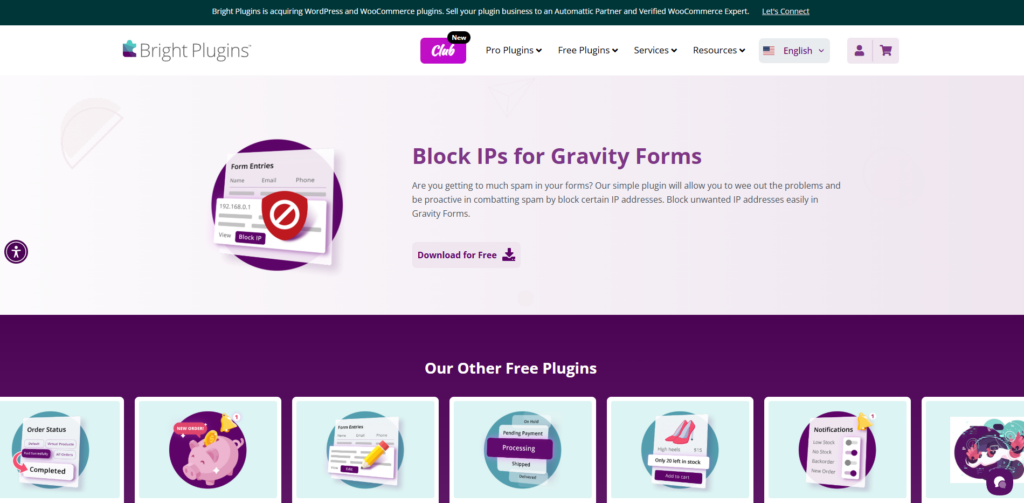
A lightweight, free plugin that allows blocking of specific IP addresses from submitting Gravity Forms entries. It is useful for stopping repeat spam offenders quickly without server-level rules or complex configuration.
- Blocks selected IP addresses across Gravity Forms
- Simple blocklist management inside WordPress
- Helps reduce repeat form spam
- Minimal performance impact

Wordfence Security
A full WordPress security plugin that includes robust IP blocking and firewall rules to stop spam traffic before it reaches forms.
- Real-time IP blocking and rate limiting
- Firewall blocks malicious requests early
- Click-to-block IPs from activity logs

Sucuri Security
Sucuri adds server-side protection and firewall-level IP blocking that complements Gravity Forms spam controls.
- Web Application Firewall (WAF)
- Country and IP range blocking
- Activity logging for spam analysis

Cloudflare
Cloudflare protects forms by filtering malicious traffic at the network edge, reducing bot submissions before WordPress loads.
- IP and country-based blocking
- Bot management and rate limiting
- Reduces server load from spam traffic

Gravity Forms Zero Spam
A lightweight anti-spam plugin built specifically to work with Gravity Forms and other form plugins. It blocks known spam patterns automatically without CAPTCHA friction.
- Automatically blocks known spam IPs
- No CAPTCHA or user interaction required
- Integrates cleanly with Gravity Forms entries
Getting Help When Spam Persists
If IP blocking, honeypots, CAPTCHA, and server-level rules have already been applied but spam continues, it may signal a more persistent or targeted attack. At this stage, the goal shifts from simple filtering to deeper investigation and layered escalation. Ongoing spam can indicate automated bot networks, compromised scripts, or configuration gaps that require broader security review beyond form settings alone.
Here is what to try next:
- Document the pattern carefully: Track IP addresses, timestamps, user agents, and repeated field values. Look for trends such as bursts at specific hours or submissions targeting only one form.
- Review server logs: Check access logs to see if requests are bypassing normal validation or hitting endpoints directly.
- Contact the hosting provider: Ask about firewall-level blocking, rate limiting, or WAF (Web Application Firewall) protections at the network edge.
- Run a security scan: Use a trusted security plugin to check for outdated plugins, theme vulnerabilities, or suspicious files.
- Request a professional audit: If spam feels coordinated or escalates quickly, a WordPress security specialist can identify deeper weaknesses and recommend stronger protections.
Your Next Steps
The most effective way to control form spam is to take immediate, practical action rather than waiting for it to escalate. Small adjustments made today can reduce fake submissions and protect the quality of store data moving forward. Instead of trying to implement every advanced measure at once, start with foundational protections and then build from there. A steady, layered approach helps keep forms secure without disrupting legitimate customers or overcomplicating workflow.
Begin with these focused actions:
- Enable the honeypot feature in Gravity Forms if it is not already active. It works silently in the background, blocking many automated bots instantly.
- Review recent form submissions from the past 7 to 14 days and identify repeat IP addresses or suspicious patterns.
- Block frequent offenders using the built-in Gravity Forms IP blocklist to quickly stop repeat abuse.
- Add reCAPTCHA or hCaptcha to high-value forms such as checkout, contact, and account registration pages.
- Monitor submission volume weekly to detect unusual spikes or drops that may signal new spam tactics.
- Schedule a monthly review of anti-spam settings and blocked IPs to ensure protections remain accurate and effective.
Managing form spam is an ongoing process, not a one-time fix. By consistently reviewing patterns and applying layered defenses, store owners maintain cleaner data, better performance, and stronger trust with real customers.