
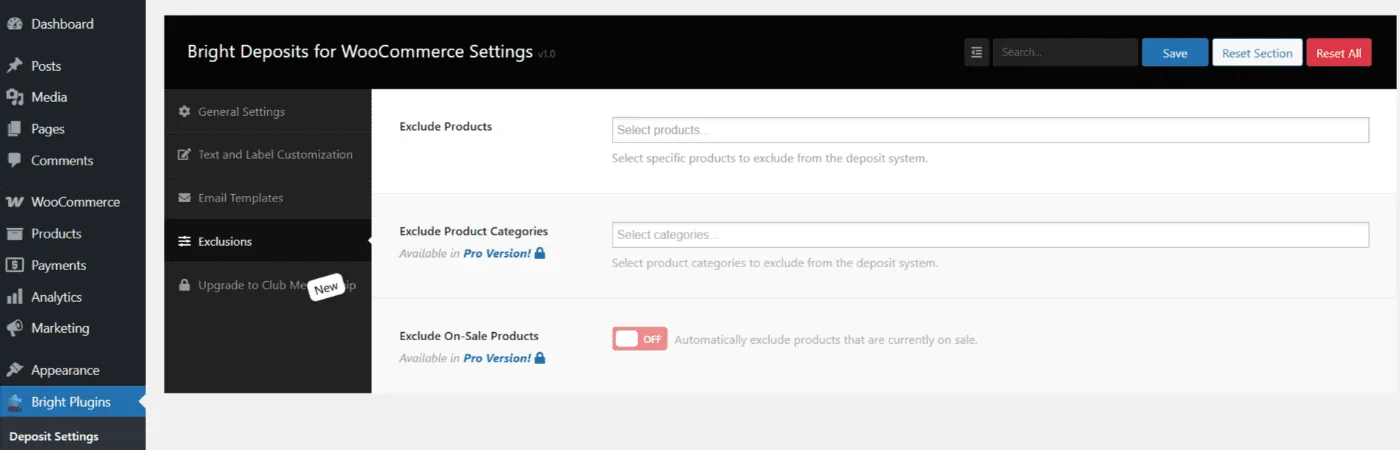
Path: WooCommerce → Bright Plugins → Deposit Settings → Exclusions
Scope: Free (products) / Pro (categories, on-sale)
What it does
Removes selected items from the deposit flow so they require full payment even if global deposits are enabled.
Settings
- Exclude Products — pick individual products to disable deposits (Free)
- Exclude Product Categories — disable deposits for entire categories (Pro)
- Exclude On-Sale Products — automatically exclude items currently on sale (Pro)
Behavior & limits
- Excluded items won’t show the deposit option; checkout is full-payment only.
- Works with Global Deposits and with Force Deposit / Hide Checkbox (exclusions override the global rule for those items).
- Variable products: excluding the parent product removes deposits for all its variations.
- On-sale exclusion follows the product’s sale status; when the sale ends, deposits apply again.
- If an item is both included and excluded by different rules, specific product exclusion takes priority.
Related usage
- Apply Deposits to All Products in Your Store
- Exclude Discounts or Promotions from Deposits
Updated on April 16, 2026 · Need help? Open a support ticket