
Summary
Every BOGO promotion is built using two simple blocks: what customers must buy (trigger) and what they receive (reward). This guide explains the logic so you can create rules confidently.
The simple rule structure#
Each BOGO rule follows the same pattern:
- Purchase These Products defines the trigger conditions.
- Receive These Products defines the reward customers get.
This structure helps you create classic BOGO offers and quantity discounts without coupons.
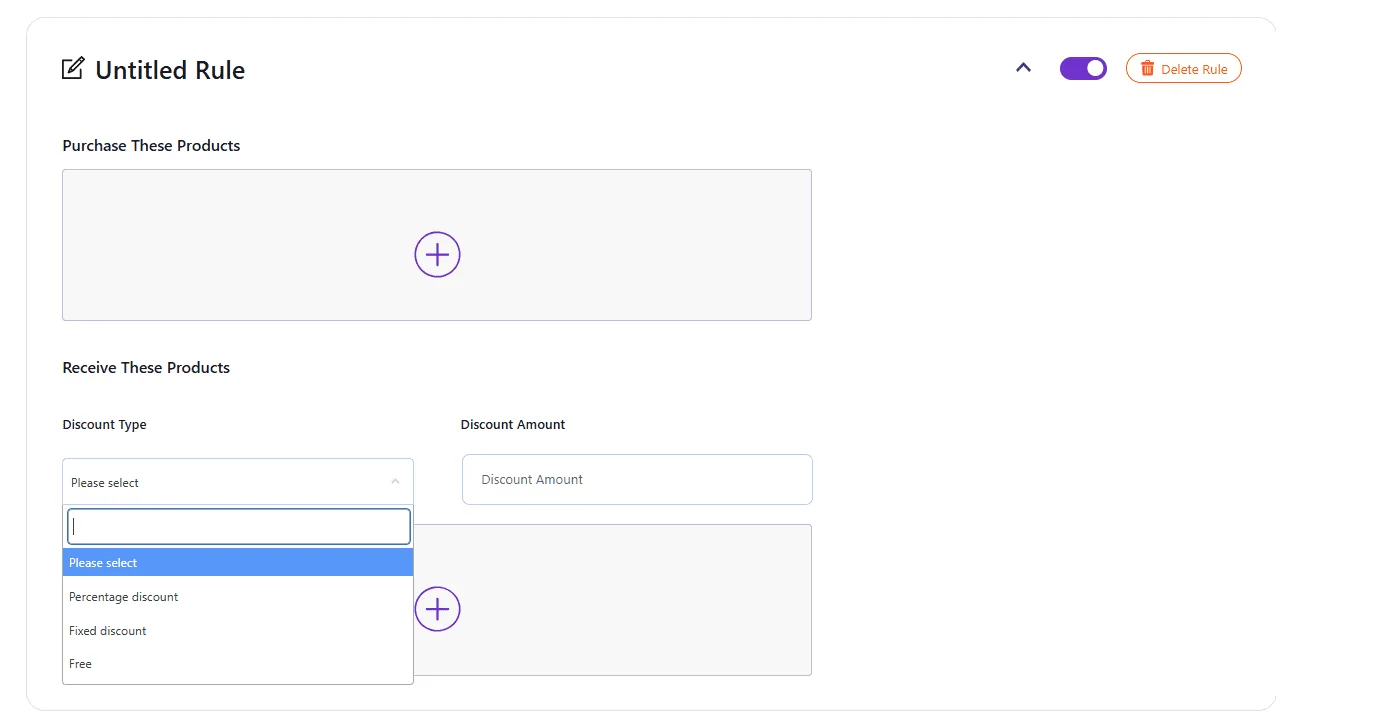
Purchase These Products (Triggers)#
What this section controls#
This section decides when the promotion activates based on:
- The product(s) customers must add to the cart.
- The Required Quantity needed to unlock the deal.
Simple trigger examples#
- Buy 1 Get 1 Free – Same Product
Trigger product: T-shirt
Required Quantity: 1 - Buy 5 Get 20% Off
Trigger product: Coffee
Required Quantity: 5
Receive These Products (Rewards)#
What this section controls#
This section decides what customers receive once the trigger is met:
- Which product gets the discount.
- How the discount is applied.
- The reward quantity.
Discount types available#
- Free
The selected reward product becomes 100% off. - Percentage discount
Reduces the reward product price by a percentage value. - Fixed discount
Subtracts a fixed amount from the reward product price.
When Discount Amount is required#
- Percentage and Fixed require a Discount Amount.
- Free does not require a Discount Amount.
How common promotions map to the rule#
Buy 1 Get 1 Free – Same Product#
- Purchase These Products:
Product A, Required Quantity = 1 - Receive These Products:
Free, Product A, Required Quantity = 1
Buy X Get Y Free (Cross-sell)#
- Purchase These Products:
Product A, Required Quantity = 1 - Receive These Products:
Free, Product B, Required Quantity = 1
Buy N Get % Off#
- Purchase These Products:
Product A, Required Quantity = N - Receive These Products:
Percentage discount, Amount = %, Product A, Required Quantity = N
Best practices#
- Name rules based on the customer-facing offer.
- Keep quantities simple and easy to understand.
- Test each rule in the cart before running a live campaign.
- Avoid overlapping promotions on the same product unless you have a clear campaign plan.
Updated on April 16, 2026 · Need help? Open a support ticket