
Summary
The Receive These Products section defines what customers get after the trigger conditions are met, including free items, percentage discounts, or fixed discounts.
Where to find this section#
- Go to Bright Plugins Pro → BOGO Deal → Rules.
- Expand any rule.
- The Receive These Products box appears below Purchase These Products.
What this section controls#
This section defines the reward of your promotion.
Once the cart meets your trigger conditions, the settings here decide:
- Which product(s) receive the discount.
- Which discount type is applied.
- How many units are discounted or free.
Fields in Receive These Products#
Discount Type#
Choose how the reward is applied:
- Free
- Percentage discount
- Fixed discount
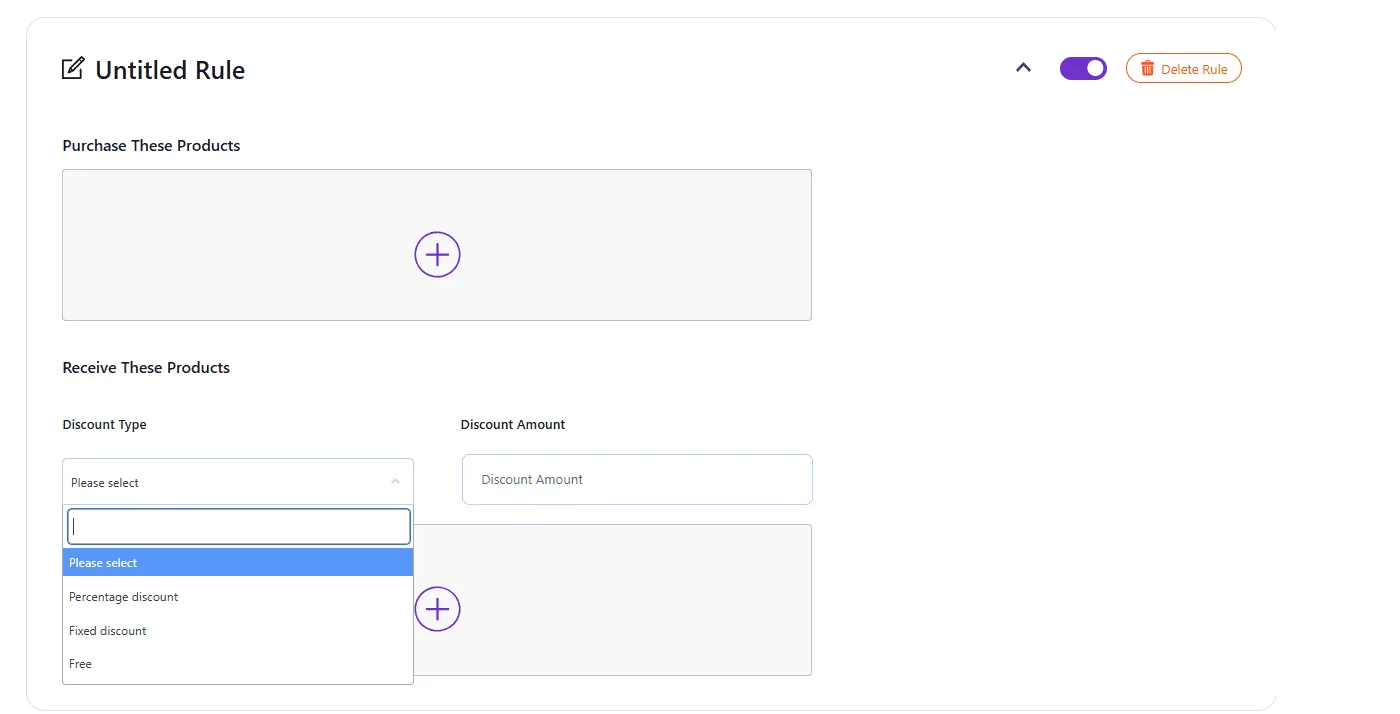
Discount Amount#
Set the discount value:
- Required for Percentage and Fixed discounts.
- Not required for Free.
Product#
Select the product that will be discounted or given for free.
Required Quantity#
Set how many units of the selected reward product receive the discount.
Add multiple reward products#
When to use multiple rows#
Use multiple reward rows when a single promotion offers more than one reward.
How it works#
- Click the plus (+) icon to add another reward row.
- Set Discount Type, Discount Amount (if needed), Product, and Required Quantity for each row.
- The rule will apply all rewards defined in the section when the trigger is met.
Examples#
Buy 1 Get 1 Free – Same Product#
- Discount Type: Free
- Product: T-shirt
- Required Quantity: 1
Buy 1 Laptop, get a free Mouse#
- Discount Type: Free
- Product: Mouse
- Required Quantity: 1
Buy 5 Get 20% Off – Same Product#
- Discount Type: Percentage discount
- Discount Amount: 20
- Product: Coffee
- Required Quantity: 5
Buy 3 Get $10 Off – Same Product#
- Discount Type: Fixed discount
- Discount Amount: 10
- Product: Shampoo
- Required Quantity: 3
Best practices#
- Ensure the reward Product matches the offer shown on the product page.
- Use Free for classic 2×1 and cross-sell giveaways.
- Keep reward quantities easy to understand.
- Test the rule in the cart before launching a live campaign.
- Avoid overlapping reward logic on the same product unless you have a clear campaign plan.
Updated on April 17, 2026 · Need help? Open a support ticket