您的隐私选择

我们使用 Cookie 了解网站的使用情况,并与 Google 和 Meta 一起衡量我们的广告效果。在您做出选择之前,不会设置任何内容。您可以随时在 Cookie 设置中更改您的选择。

隐私政策

我们使用 Cookie 了解网站的使用情况,并与 Google 和 Meta 一起衡量我们的广告效果。您可以随时在您的隐私选择中更改您的选择。

您的隐私选择

请选择我们可以使用哪些 Cookie。您的选择适用于所有页面,有效期为 12 个月。

我们已遵守您的拒绝偏好信号。只要您的浏览器发送该信号,广告将保持关闭。

必要让网站保持正常运行:您在此处的隐私选择、您正在阅读的语言、文档搜索,以及 Cloudflare 对网站的防护。
始终开启
Google Analytics 和 Cloudflare Web Analytics,以及 WooCommerce 自身对您访问起始页面的记录:哪些页面被阅读、网站如何被使用,以及其中哪些带来了订单。
Google Ads 和 Meta 像素:衡量并改进我们的广告,包括在其他网站上的广告。
ThriveDesk 为我们的支持页面提供在线聊天。它由另一家公司运营,并会在您的浏览器中存储一个标识符。
隐私政策

翻译 WooCommerce 预售插件

1 分钟阅读 更新于 2026年4月22日 Bright Plugins 团队

获取 Pre-Orders Pro

市面上有许多插件可用于翻译插件,但我们最推荐使用的是 Loco Translate 插件。

您可以通过以下链接查看该插件的支持页面和新手指南:

https://localise.biz/wordpress/plugin/support
https://localise.biz/wordpress/plugin/beginners

1. 安装 WooCommerce 预售和 Loco Translate 插件后,您需要在 Loco 插件中为该插件创建一种新语言。请点击“创建新语言”。
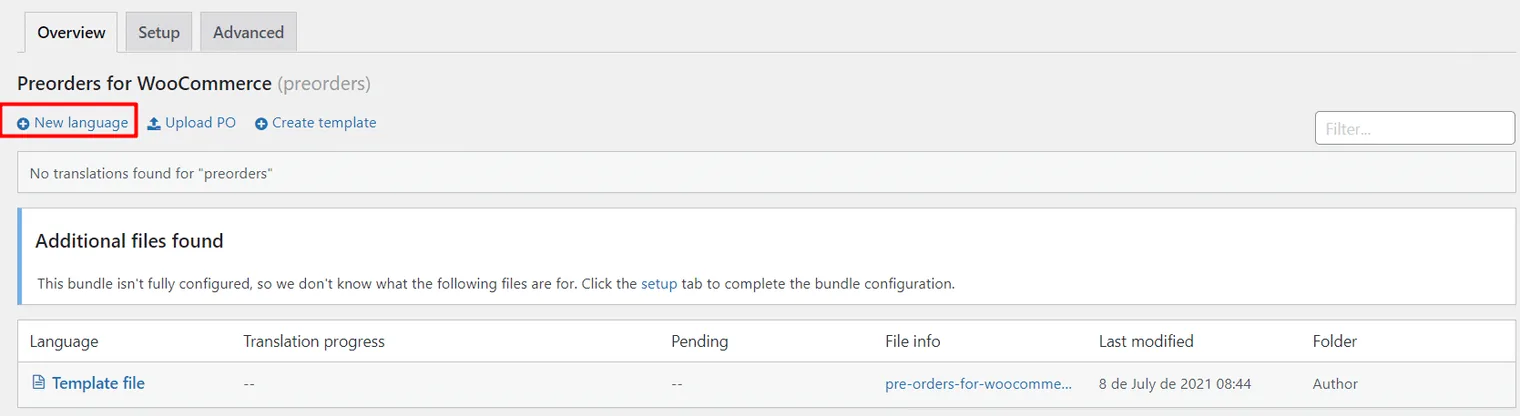
WooCommerce 预售: The Loco Translate overview for Preorders for WooCommerce, reporting no translations found, with the New language link marked

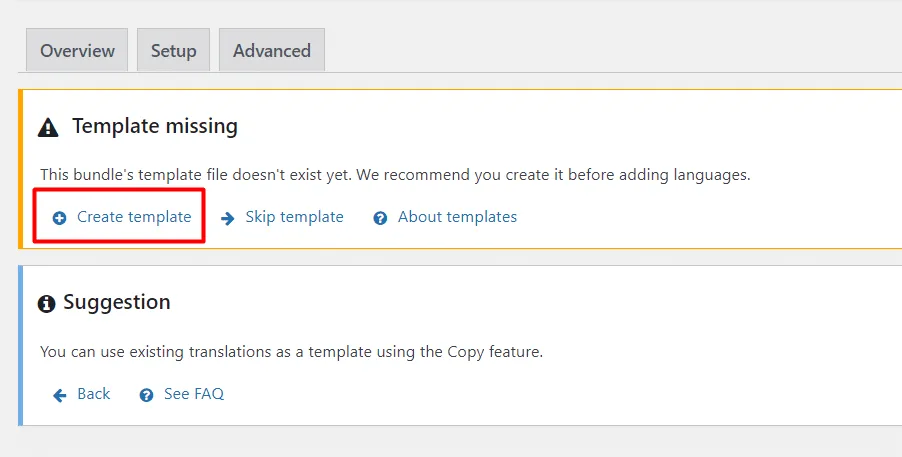
2. 然后选择“创建模板”。

WooCommerce 预售: A Loco Translate warning that the bundle's template file does not exist yet, with the Create template link marked

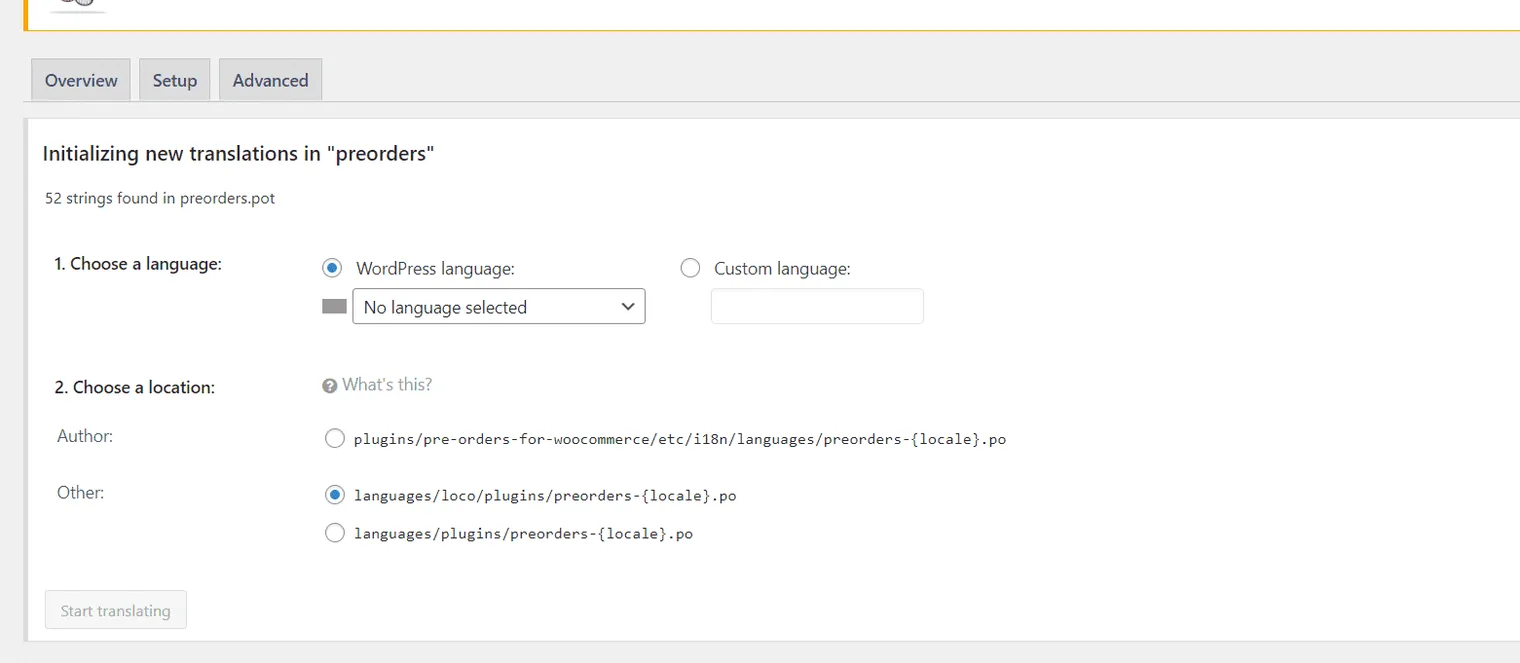
3. 返回新语言部分。

WooCommerce 预售: Loco Translate initializing new translations, 52 strings found, offering a language choice and three file locations

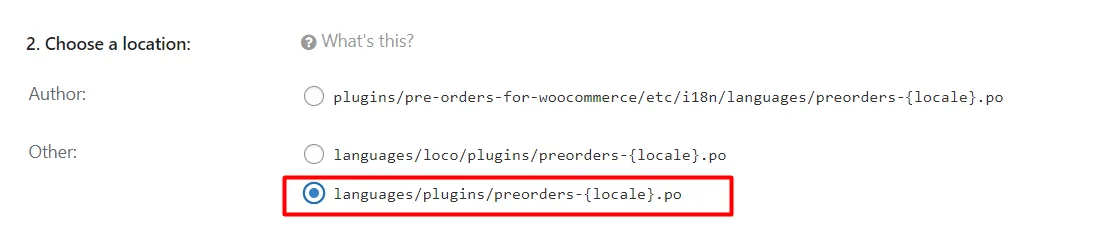
4. 选择语言,并将文件保存到下方所示的路径中。

WooCommerce 预售: The Loco Translate location choice with languages/plugins/preorders-{locale}.po selected

请查看完整文档:WooCommerce 预售

如何在 WooCommerce 中显示可用日期 & 启用预售徽章?>

更新于 2026年4月22日 · 需要帮助?请提交支持工单