
WooCommerceのログインフォームと登録フォームをカスタマイズする方法は?
How to Customize WooCommerce Login and Registration Form? If you’re a hard-working entrepreneur online today, then the odds are high that you rely on WooCommerce. WooCommerce, in a nutshell, is a WordPress e-commerce plug-in that has been gaining a lot of traction for years. You can take your e-commerce approach to the next level by learning how to customize your WooCommerce login and registration form.
この記事をお読みください WooCommerceのログインフォームと登録フォームをカスタマイズする方法?によって ブライトプラグイン
Take Advantage of “User Registration”
Do you want to customize your WooCommerce login and beyond? If you do, it may be time for you to look into using a plug-in by the name of User Registration. User Registration, in short, enables people to put together streamlined and efficient site registration and login forms. It’s equipped with a drag-and-drop setup that’s a piece of cake to use. If you don’t know about coding, this interface may do a lot for you. That’s because it makes managing all sorts of tweaks realistic and hassle-free for users.
Taking advantage of this plug-in isn’t hard. Install it. Voila! You’re ready to get moving in the right direction.
https://wpeverest.com/wordpress-plugins/user-registration/
追加フィールドの導入
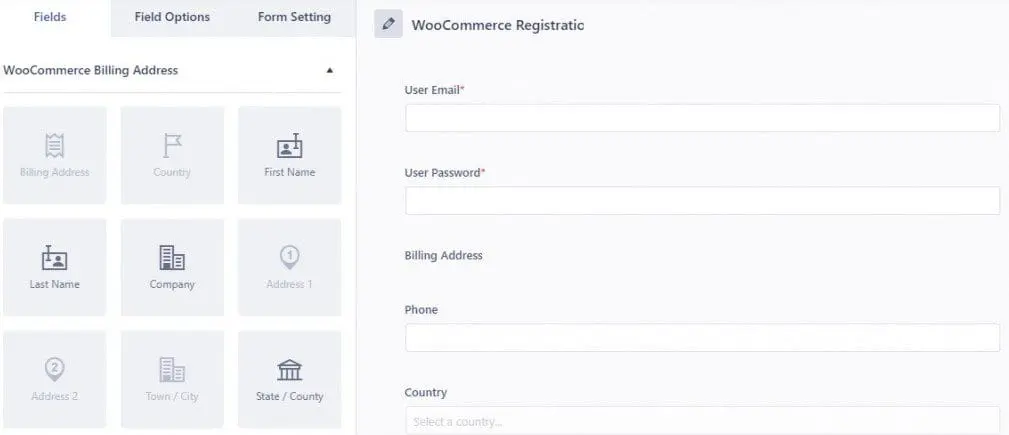
If you go forward with the previously mentioned plug-in, you can introduce extra fields to accommodate your existing registration form. You can kick things off by establishing a brand new form and clicking on “Fields” to manage your shipping and billing field needs.
標準フォームの切り替え
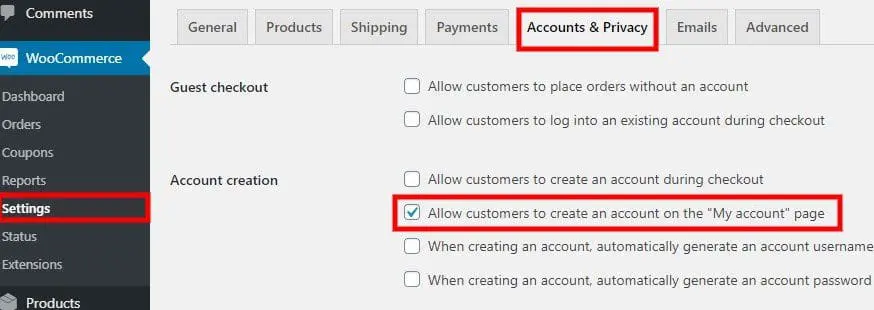
Once you’ve set up the fresh new form for registration or login purposes, then you can switch it out with the standard one for WooCommerce. Head to Settings and click on Accounts and Privacy. Go straight to Account Creation. After that, you can tick off the part that asks you whether you want customers to be able to set up accounts on their own. Finally, you can safeguard all of the changes that you’ve just made.
Head to Settings and click on WooCommerce. This is where you can pick the designated registration form. Tick off the “Check this option” to switch out the essential registration and login page. You’ll finally see your bespoke registration and login form for WooCommerce.
登録ページを単独で表示したい場合は、ユーザー登録に移動してショートコードを取得します。コピーしてください。
追加フィールドの表示
Once users sign up for brand new accounts, they’re sent straight to “My Accounts.” Go to Account Details to look at any extra details associated with your registration or log-in pages.
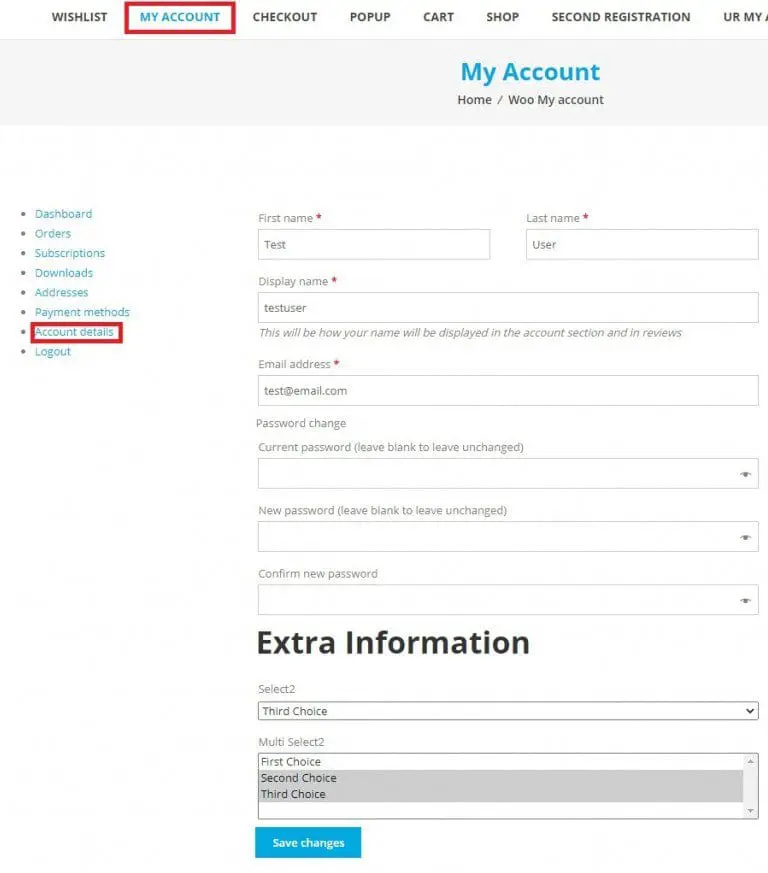
WooCommerceアカウントを実装する
If you want to simplify things for your valued customers, you can quickly and efficiently do so. You can opt to display the bespoke registration form via your checkout page. If you wish to implement your existing WooCommerce account via the checkout, go to Settings and then Accounts and Privacy. Click on Accounts Creation and tick off “allow customers to create accounts during checkout.”
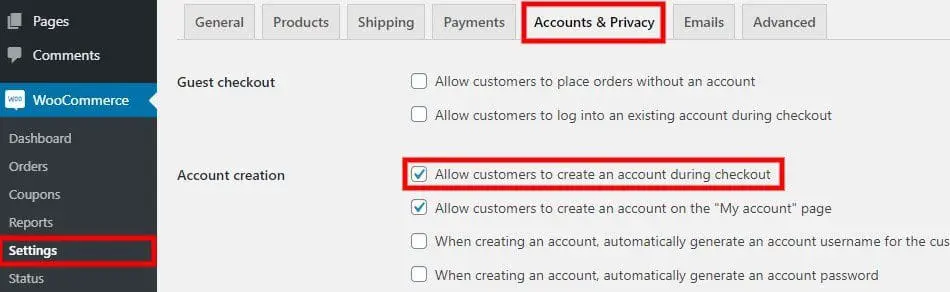
設計アプローチの見直し
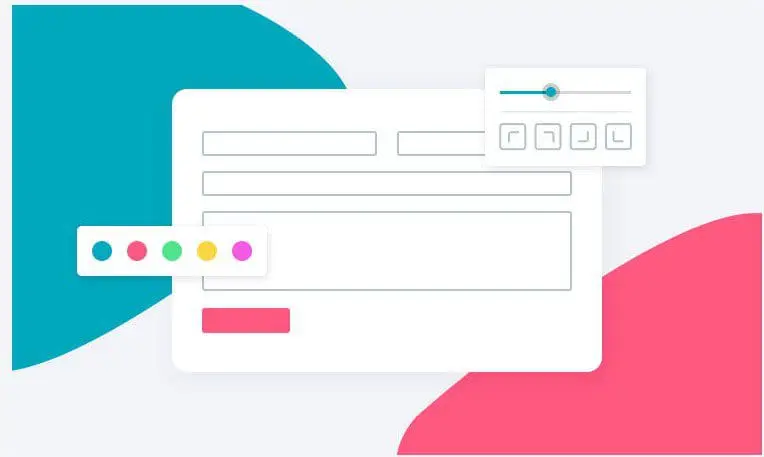
ユーザー登録は、登録フォームとログインフォームへのアクセスを100%オーダーメイドで望む人々にとって、ゲームチェンジャーとなる可能性のあるプラグインです。単にスタイルカスタマイザーとして知られているものを最大限に活用できます。この機能により、ユーザーは登録フォームの外観を合計で更新できます。これを利用することは公園を散歩するようなものでもあり、貴重な時間を一秒も無駄にすることなくプレビューできるドラッグ アンド ドロップ コンポーネントがあります。
It can help to purchase Style Customizer. Once you do that, you can tweak the WooCommerce form that you already have. You can even establish a brand new one. After that, hit the button for Form Designer. It highlights a paintbrush that’s tough to miss, and it’s situated on the lower right of any computer screen.
You’ll be able to view the customizer panel without any difficulties. This enables you to tweak various design components related to registration and login forms. You can make adjustments that relate to buttons, checkboxes, field labels, and form wrappers galore. Note, too, that you can even reap the rewards of spare options suitable for CSS, messages, and titles for sections.
Once you’re through with the customization process, save everything without dilly-dallying. All of your Style Customizer tweaks be instantly implemented into the registration and login form you have with WooCommerce. This can significantly help people who want to view their tweaks via their Internet shop from locations.
https://wpeverest.com/wordpress-plugins/everest-forms/style-customizer/
WooCommerce登録フォームをカスタマイズするための強力なインセンティブ
If you’re like most online entrepreneurs, you have strong incentives to customize your WooCommerce registration form. If you customize WooCommerce login components, you can simplify things. You can make things simpler for the customers who take the time to check out your shop in its glory.
Are you trying to customize WooCommerce login matters and more? This can be smart for an abundance of pressing reasons. It can help people who have concerns about field choices that are somewhat restricted. The standard login form has sufficient fields for those who want to make accounts in the first place. People who are looking to introduce extra fields, however, aren’t able to accomplish that instantly. That’s where customization comes in handy.
WooCommerceの登録フォームとログインフォームは、自然に1つのページに表示されます。カスタマイズすることで、独自のページに表示したい場合は、正しい軌道に乗ることができます。登録とログインの目的で個々のページを設定できないことに気付くと、イライラするかもしれません。この挫折を乗り越えたいのであれば、コーディングの仕事を検討する時期が来たのかもしれません。
There are some design restrictions in place. Thankfully, customization can, in many situations, turn them around entirely. If you believe that the sight of your standard registration and login form is the definition of cumbersome and tiring, then customization may be a lifesaver for you. WooCommerce doesn’t enable people to individualize these things even for a second. If you find it frustrating not to take full advantage of borders, formats for texts, and colors, then customization may be able to put a massive grin on your face.
そもそも、なぜWooCommerceの登録ページとログインページにそんなに多くの時間を費やす必要があるのでしょうか?これにより、より多くの顧客を呼び込む道が開かれます。大切な顧客に強固なインセンティブを与え、誰でも簡単に作成できるインターフェイスにアクセスできるようにするのに役立ちます。インターネット ショップを次のレベルに引き上げたい起業家にとって、ニュアンスは非常に重要です。
Website usability is paramount in this day and age. If you have any reason to suspect that your website isn’t user-friendly, you must take action as soon as possible, period. Investing in a simple login form can be terrific for usability applications. It can be wise to have many login choices for all users. That’s because these choices can stop users from feeling overwhelmed and pave the way for speedy order completion and supervision.
呼び出し ブライトベッセル より多くの電子商取引支援のために。


